
Chrome Extension
Getting Started with Chrome Extensions: A Beginner’s Guide
This guide will walk you through the fundamentals of building a Chrome extension, including its core architecture, key components, and how they all work together. By the end, you’ll have a reference to a simple demo extension so you can get hands-on experience.
What Is a Chrome Extension?
A Chrome Extension lets you enhance and personalize your browsing experience. It bridges the gap between the browser’s default capabilities and what you wish it could do.
You’ve probably used extensions before, an ad blocker, a password manager, or a dark mode toggle, for example. Each one addresses a specific need that the browser doesn’t handle out of the box. That’s the essence of Chrome extensions: they make your web experience smarter, faster, and more tailored to your needs.
High-Level Chrome Extension Architecture
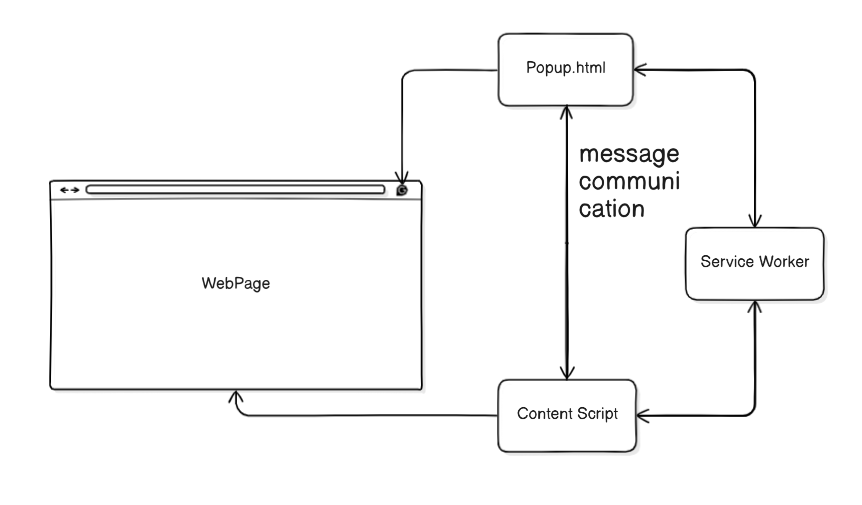
Here are the core building blocks of a Chrome extension:
- manifest.json – The heart of your extension. This file contains configuration, permissions, and tells Chrome what to load.
- contentScript – Works directly with the web page DOM. It can read, modify, or interact with the page content.
- serviceWorker – Acts as the background brain of your extension. It handles logic, background tasks, and communication between components.
- popup.html – The visible interface that appears when the user clicks the extension icon.
Key Concepts to Learn Before You Start
Message Communication
Different parts of an extension, like the popup, content scripts, and service worker need to communicate with each other. Chrome provides the chrome.runtime API to send and receive messages between these components.
Reference: Chome runtime messaging
Chrome Service Worker APIs
The service worker comes with a variety of APIs for managing background tasks, handling alarms, and interacting with browser tabs. These APIs help centralize your extension’s logic and keep background tasks organized.
Reference: Chrome Extensions API Reference
Hands-On Project: Tab Activity Monitor
To put these concepts into practice, we’ll build a simple Chrome extension that tracks your open tabs and monitors your active tab in real-time.
This project will give you hands-on experience with the core components of a Chrome extension: Manifest, Content Scripts, Service Workers, and Popup Communication.
Reference: Demo Extension on GitHub